SQR-109
BigQuery Kafka-based TAP service#
Abstract
SQR-097 introduced an event-based architecture for TAP over QServ, which uses Kafka (Sasquatch) as a messaging layer between the TAP service and Qserv. This architecture provides better scalability, unlocks functionality like query cancellation, monitoring and provides decoupling benefits.
This technote describes the extension of that architecture to support BigQuery as an additional database backend, enabling us to run a BigQuery-based TAP service and have the benefits of the decoupling.
The design leverages the existing qserv-kafka bridge implementation, adding a BigQuery bridge that follows the same patterns while accounting for BigQuery specific APIs and behaviors.
1. Introduction#
The RSP currently provides TAP access to data through QServ (tap) and PostgreSQL (ssotap).
The current plan for the Prompt Products Database (PPDB) is to store it in Google BigQuery and this work extends the TAP infrastructure to support BigQuery as an additional backend.
The event-based architecture from SQR-097 is well-suited for this extension. By decoupling the TAP service from the database through a Kafka event-bus, we can re-use the pattern and architecture that we’ve built for the QServ TAP service and extend it to offer BigQuery support. The BigQuery bridge will follow the same patterns as the QServ bridge: consuming job requests from Kafka, executing queries, streaming results to GCS and publishing status updates (potentially including progress information, if such a feature is available with BigQuery).
Goals#
This work aims to enable TAP access to BigQuery-hosted catalogs while reusing as much existing infrastructure as possible. This should all be transparent to end users, whose should experience consistent behavior whether querying QServ or BigQuery, i.e. the same result formats (VOTable BINARY2, VOParquet), the same UWS job management, and the same GCS-based result retrieval.
Scope#
The initial implementation covers catalog queries only. ObsCore, DataLink, and TAP_SCHEMA are not described in this document, although TAP_SCHEMA support is a requirement for the TAP service, but the implemnetation will follow what is done for the QServ TAP service.
2. System Architecture#
The BigQuery TAP system mirrors the QServ TAP architecture with parallel components for the BigQuery backend.
A separate TAP service (lsst-tap-bigquery) handles ADQL-to-BigQuery SQL translation and publishes job request events to Kafka.
A BigQuery bridge (added to qserv-kafka) consumes these requests, executes queries against BigQuery and writes results to GCS.
Both systems share Sasquatch (Kafka), GCS result storage, and Phalanx deployment patterns.
They will run as separate deployments with distinct endpoints, access BigQuery TAP through a path like /api/bigquery rather than /api/tap. The actual path here is to-be-determined.
This separation ensures that issues with one backend don’t affect the other and each system can scale independently. The BigQuery bridge will be built into the qservkafka FastAPI application (https://github.com/lsst-sqre/qserv-kafka/tree/main/src/qservkafka), the two applications will deploy the same Docker Image, but configuration will be used to determine which adaptation will be used.
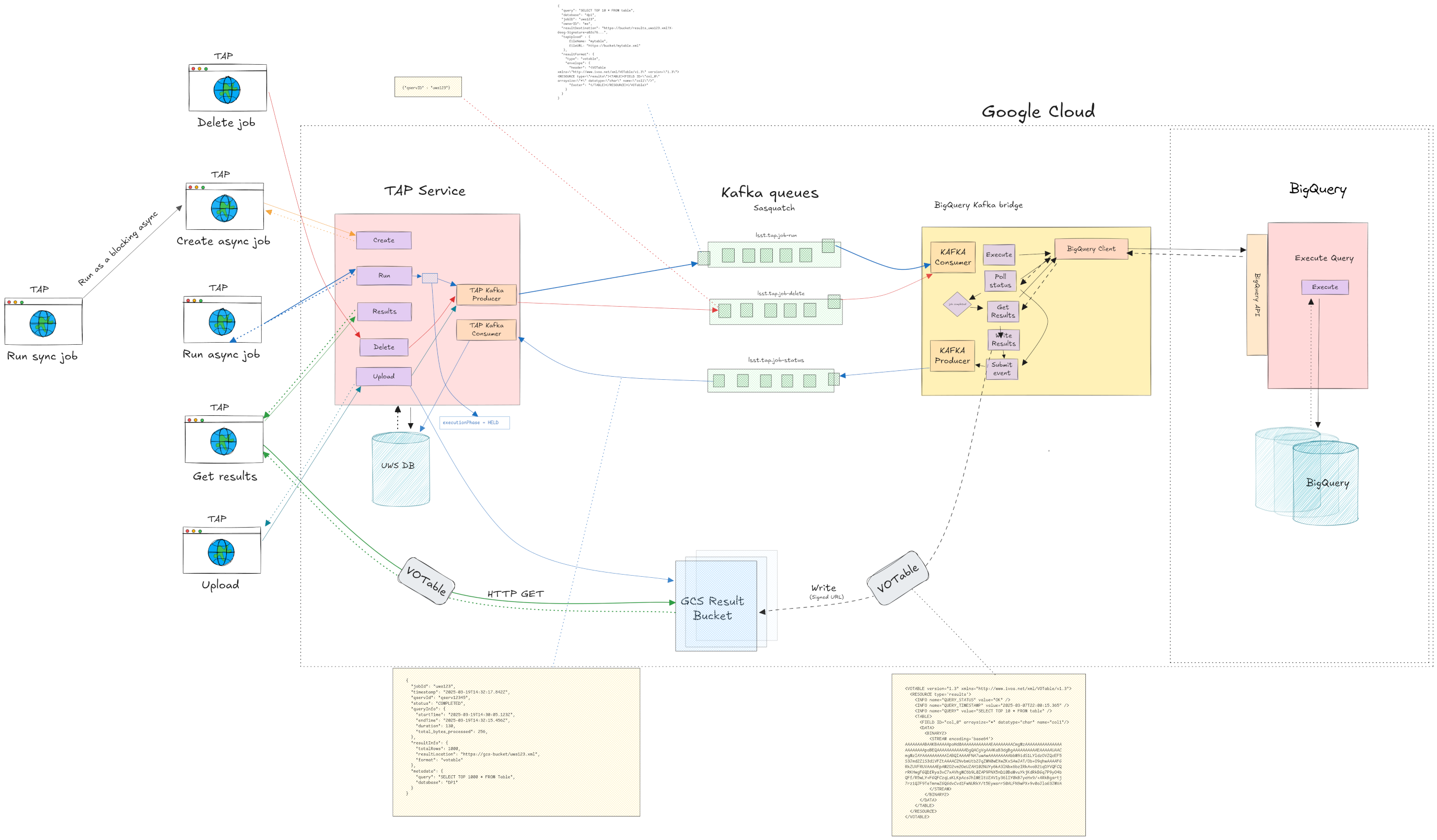
Fig. 1 Proposed Architecture Diagram#
3. Query Execution Flow#
The query execution flow follows the same pattern documented in SQR-097. For async queries the TAP service will validate the ADQL query, translate it to BigQuery SQL, generate the VOTable envelope with field metadata, and publish a job-run event to Kafka.
The BigQuery bridge will then pick up the event, submit the query using BigQuery’s async Jobs API, poll for completion and then fetch the results, stream them to GCS in the requested format and finally publish status updates back through Kafka.
The TAP service will be consuming these status updates, and update the UWS database accordingly.
Synchronous queries will use the sync-over-async pattern where the TAP service creates an async job internally and blocks while polling for completion.
Job cancellation works by publishing a cancel event that the bridge consumes, calling BigQuery’s job cancellation API.
The key difference from QServ is how we interact with the database. Where QServ uses its HTTP REST API and SQL async interface, the BigQuery bridge uses the Google Cloud BigQuery client library. Section 5 covers the BigQuery interaction model in detail.
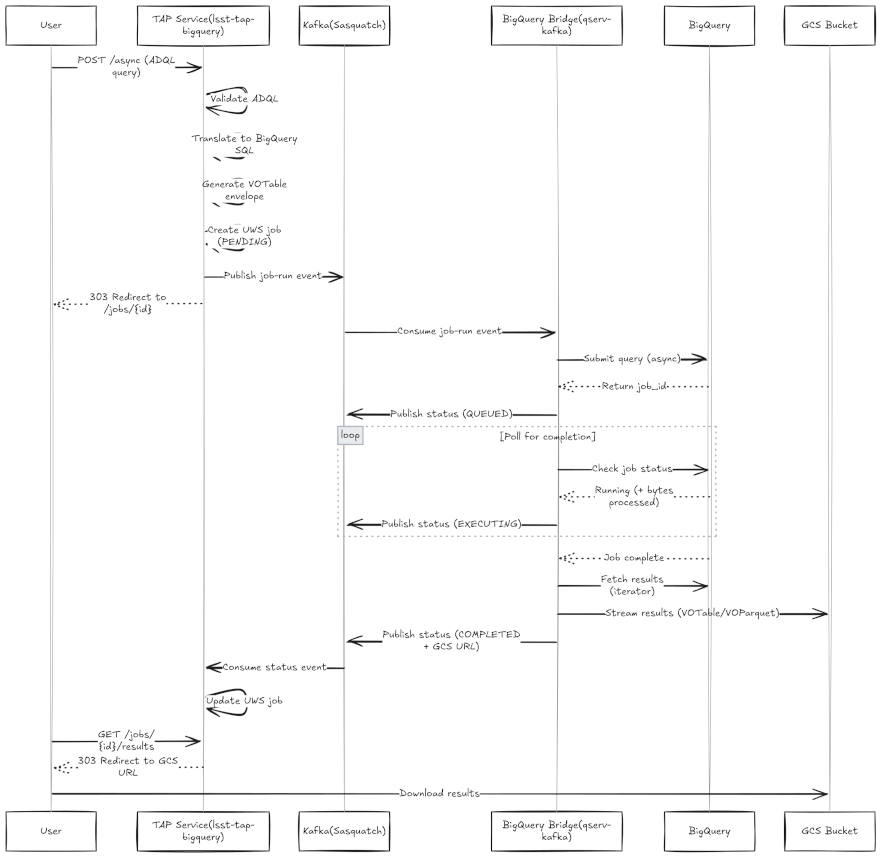
Fig. 2 Proposed Flow Diagram#
4. Kafka Topics and Event Schemas#
The BigQuery TAP system uses separate topic namespaces from QServ:
lsst.bigquery.job-runlsst.bigquery.job-deletelsst.bigquery.job-status
The event schemas will be identical to those defined in SQR-097. The job-run event contains the translated SQL query, job identifiers, result destination (signed GCS URL) and result format specification including the VOTable envelope and column types. The job-status event reports execution state, timing information, and result metadata.
The only notable potential differences will be any BigQuery-specific fields in the status event’s progress metadata. This will require further investigation to identify if progress information is available via BigQuery’s APIs during execution, in which case we will utilize the schema as provided since the use of “chunks” is not applicable here.
5. BigQuery Bridge Implementation#
The BigQuery brige will be added to the existing qserv-kafka repository rather than created as a separate service.
This allows us to reuse common code and functionality like Kafka messaging, GCS result writing, and VOTable/VOParquet serialization between the QServ and BigQuery bridges.
How BigQuery Works#
With QServ, we connect to a frontend (the Czar) that coordinates query execution across worker nodes. The data is partitioned into chunks and QServ tracks progress as each chunk completes. We can connect via MySQL protocol or the HTTP API, and the infrastucture management is done via the QServ team.
With BigQuery there are no servers to manage, no connections to maintain and no visible infrastructure. From the TAP service’s point of view we simply send a SQL query to Google’s API and BigQuery handles everything else (parsing, optimization, distributing work across Google’s internal infrastructure, and assembling results), as well as managing the compute resources and scaling them based on query complexity.
The BigQuery data model organizes data into three levels.
A project (tied to billing and access control, as is the case for all Google Cloud services)
Datasets are logical groupings of related tables, similar to schemas in PostgreSQL or databases in MySQL.
Tables hold the actual data. When referencing a table in SQL, we use the fully-qualified form
project-id.dataset_name.table_name. For example, if we store DP1 catalogs in a dataset calleddp1in the projectidfprod, we’d reference tables asidfprod.dp1.object.
Every query in BigQuery creates a “job”, so when we submit SQL, BigQuery creates a job resource with a unique ID, starts executing it asynchronously and returns immediately. The query runs in the background (how long depends on complexity and data volume). We then poll the job status to find out when it completes, then retrieve results through the API.
This maps naturally to our Kafka-based async architecture.
BigQuery caches query results for 24 hours. If we run the exact same query twice, the second execution returns cached results instantly without scanning any data (and without cost).
The bridge can detect cache hits and report them in status updates, which might be useful information for users who re-run queries.
One significant difference from QServ is the cost model.
QServ runs on infrastructure we operate, so the cost is primarily the servers regardless of query volume. BigQuery on the other hand charges per query based on bytes scanned. This has implications for how we might want to handle user queries, such as implementing cost warnings or limits. We may want to consider adding a pre-flight check that estimates cost before submitting and fails with an error if it exceeds a certain threshold.
Async Considerations#
The google-cloud-bigquery Python client is synchronous, which means that the BigQuery client calls would probably have to be wrapped with asyncio.to_thread().
Query Lifecycle#
The bridge interacts with BigQuery through the google-cloud-bigquery Python client library.
Here’s how a query will flow through the system:
Submitting a query:
The bridge creates a QueryJobConfig specifying that we want standard SQL (not BigQuery’s legacy SQL dialect) and optionally attaches labels for tracking.
It then calls client.query(sql, job_config=config), which returns a QueryJob object.
We can then monitor this running query using that job ID, or use it for subsequent operations like query cancellation.
from google.cloud import bigquery

client = bigquery.Client(project="idfprod")

job_config = bigquery.QueryJobConfig(
    use_legacy_sql=False,
    labels={"uws_job_id": "abc123"}
)

# This submits the query and returns immediately
query_job = client.query(
    "SELECT objectId, ra, dec FROM `idfprod.dp1.object` LIMIT 1000",
    job_config=job_config
)

bigquery_job_id = query_job.job_id
Polling for completion:
The bigquery-bridge will periodically check whether the job has finished. The QueryJob object has a done() method that returns True when the job completes (successfully or with an error).
The bridge would poll this at some interval, sending status updates through Kafka as the job progresses.
if query_job.done():
    if query_job.error_result:
        # Job failed, error details available
        error_message = query_job.error_result.get("message")
    else:
        # Job succeeded, can fetch results
        pass
The BigQuery documentation here: https://docs.cloud.google.com/bigquery/docs/reference/rest/v2/jobs/getQueryResults includes a key "totalBytesProcessed": string. Assuming this is updated while query execution is running we could use this to as the progress information metadata. If it is only reported once the query is completed, we may choose to either disregard it, or potentially still include it in the job status and then in the UWS job output. However in this case it becomes less of a priority since it’s usefullness is more limited to the users.
Fetching results:
Once the job completes successfully, calling query_job.result() returns an iterator over the result rows.
Each row is a Row object that behaves like both a dictionary and a tuple, and we can access columns by name or index.
# Iterate over results
for row in query_job.result():
    object_id = row["objectId"]  # Access by column name
    ra = row[1]                   # by index
The bridge streams through this iterator, formatting each row into VOTable BINARY2 format and writing to GCS. This follows the existing pattern which avoids loading the entire result set into memory. For VOParquet this is slightly different as we cannot stream out one row at a time, but this will still be done consistent to the QServ kafka bridge
Cancelling a job:
If the user requests cancellation, the bridge calls query_job.cancel(). BigQuery will attempt to stop the query, though there may be a short delay before it actually terminates.
job = client.cancel_job(job_id, location=location)
https://docs.cloud.google.com/bigquery/docs/samples/bigquery-cancel-job
For job deletion events, the TAP service will send a job delete event to Kafka. The bridge will then look up the BigQuery job ID and call the cancel method on that job leading BigQuery to then stop the query.
Code Organization#
The qserv-kafka codebase will need restructuring to support multiple backends.
The recommended approach is to introduce a backend abstraction that encapsulates database-specific operations: submitting queries, checking status, cancelling jobs, and fetching results.
Current Coupling to QServ:
QueryService,QueryMonitor, andResultProcessordirectly depend onQservClientProgress reporting assumes QServ’s chunk-based model
State models contain QServ-specific fields (
total_chunks,completed_chunks)Query IDs are stored as integers (QServ-specific)
Required Changes:
1. Backend Abstraction Interface
Create DatabaseBackend abstract class defining operations all backends must implement:
submit_query(),get_query_status(),get_query_results_gen()cancel_query(),delete_result()upload_table(),delete_database()list_running_queries()
2. Backend-Specific Implementations
QservBackend: Wraps existingQservClientBigQueryBackend: New implementation usinggoogle-cloud-bigquery
3. State Model Changes
Change query ID from int to str to support both QServ (integer IDs) and BigQuery (UUID strings):
class Query(BaseModel):
    query_id: str  # Changed from int
Note that this changes the Redis state, so it is a breaking change that will have to be carefully rolled out.
4. Progress Model Abstraction
Extend JobQueryInfo to support both chunk-based (QServ) and byte-based (BigQuery) progress:
class JobQueryInfo(BaseModel):
    start_time: DatetimeMillis
    end_time: DatetimeMillis | None = None

    # QServ progress (optional)
    total_chunks: int | None = None
    completed_chunks: int | None = None

    # BigQuery progress (optional)
    bytes_processed: int | None = None
    cached: bool | None = None
5. Exception Translation
Backends throw different exceptions. Define common exception types, for example:
BackendSubmitError- Query submission failedBackendQuotaError- Resource quota exceeded
6. Result Streaming
The get_query_results_gen() method must:
Stream results row-by-row as tuples of Python primitives
Handle retries at the backend level
Convert backend-specific types to Python primitives (int, float, str, bool, bytes)
QServBackend: Uses existing SQL cursor fetching
BigQueryBackend: Iterates QueryJob.result()
7. Service Layer Refactoring
All services (QueryService, QueryMonitor, ResultProcessor) must accept DatabaseBackend instead of QservClient, use backend interface instead of direct QServ calls and handle query_id as string throughout.
8. Dependency Injection
The existing Factory class provides the injection point:
class Factory:
    def create_backend(self) -> DatabaseBackend:
        """Create backend based on config.backend_type"""
        match config.backend_type:
            case "qserv":
                return QservBackend(self.create_qserv_client())
            case "bigquery":
                return BigQueryBackend(
                    project=config.bigquery_project,
                    location=config.bigquery_location,
                )

    def create_query_service(self) -> QueryService:
        return QueryService(
            backend=self.create_backend(),  # Changed from qserv_client
        )
9. Configuration Validation
Add validation ensuring backend-specific config is present:
@model_validator(mode="after")
def validate_backend_config(self) -> Self:
    if self.backend_type == "qserv":
        if not self.qserv_http_url:
            raise ValueError("QServ backend requires qserv_http_url")
    elif self.backend_type == "bigquery":
        if not self.bigquery_project:
            raise ValueError("BigQuery backend requires bigquery_project")
    return self
Listing running queries
Whether the capability to list running queries exists in a usable way in the BigQuery backend needs further evaluation, but an initial review of the documentation shows that it seems possible:
The Jobs API supports filtering by state and labels:
# Use all_users to include jobs run by all users in the project.
print("Last 10 jobs run by all users:")
for job in client.list_jobs(max_results=10, all_users=True):
    print("{} run by user: {}".format(job.job_id, job.user_email))

# Use state_filter to filter by job state.
print("Last 10 jobs done:")
for job in client.list_jobs(max_results=10, state_filter="DONE"):
    print("{}".format(job.job_id))
https://docs.cloud.google.com/bigquery/docs/samples/bigquery-list-jobs#bigquery_list_jobs-python
Thus we can implement the abstraction
class BigQueryBackend(DatabaseBackend):
    def list_running_queries(self) -> list[RunningQuery]:
        jobs = self.client.list_jobs(
            state_filter="RUNNING",
        )
        return [
            RunningQuery(
                query_id=j.job_id,
                started_at=j.started,
                bytes_processed=j.total_bytes_processed,
            )
            for j in jobs
        ]
Authentication#
BigQuery authentication in GKE will use Workload Identity. The Kubernetes service account running the bridge pods is bound to a GCP service account. When the bridge code creates a BigQuery client without explicit credentials, the client library should automatically obtain credentials through the GKE metadata server, though how this works in practice will become clearer upon initial experimentation.
The GCP service account needs permission to create, get, and cancel BigQuery jobs, read data from the specific datasets being queried, and create objects in the GCS bucket where results are written.
This will be configured through IAM role bindings in GCP.
Configuration#
The bridge needs to know which GCP project to use for billing and job submission, and which BigQuery location (region) the datasets live in.
bigquery:
  project: "science-platform-dev"
  location: "US"
  poll_interval_seconds: 2
  timeout_seconds: 21600
6. TAP Service Implementation#
A new repository lsst-tap-bigquery under lsst-sqre will provide the BigQuery TAP service.
This repo will follow the same patterns as lsst-tap-service, extending the CADC TAP library with Rubin-specific customizations.
Relationship to Existing Code#
SQR-099 documents the modifications made to the CADC TAP service for RSP deployment. Many of these carry over directly to BigQuery TAP, but in essence we will for the most part want to re-use what we built for the lsst-tap-service with adaptations for the ADQL-BigQuery SQL translation.
ADQL Translation#
The BigQuerySqlGenerator extends the CADC SQL generator to produce BigQuery-compatible SQL. Key differences from standard SQL include:
BigQuery uses backticks for identifier quoting rather than double quotes.
Table references must be fully qualified as
project.dataset.table.The ADQL
TOPclause becomes BigQuery’sLIMIT.ADQL geometry functions need translation to BigQuery Geography functions or custom UDFs, depending on what spatial query support is required for the initial catalogs.
The translation layer also needs to handle BigQuery’s type system. The TAP_SCHEMA (stored in CloudSQL) provides the authoritative column metadata, and the translator ensures queries produce results that match the declared types.
Kafka Integration#
The BigQueryQueryRunner replaces direct query execution with Kafka message publishing.
When a job runs, the runner builds a job-run event containing the translated SQL, result format specification (including the VOTable envelope generated from TAP_SCHEMA metadata), and destination URL.
It publishes this to lsst.bigquery.job-run and updates the UWS job status to QUEUED.
A separate Kafka consumer listens to lsst.bigquery.job-status and updates the UWS database as status events arrive. (Same pattern as the QServ TAP service)
TAP_SCHEMA Queries#
Queries against TAP_SCHEMA tables execute directly against CloudSQL via JDBC, bypassing Kafka. The BigQueryRunner checks whether a query references only TAP_SCHEMA tables and routes accordingly.
7. Phalanx Deployment#
Two Phalanx applications are needed:
BigQuery TAP Service#
applications/bigquerytap/ - The TAP service itself, following the existing pattern for TAP services.
Phalanx uses a shared subchart pattern for TAP services. The charts/cadc-tap directory contains the common Helm templates, and individual applications like tap, ssotap, and livetap reference it as a dependency with environment-specific configuration.
A new application directory applications/bigquerytap would contain:
Chart.yaml referencing the shared subchart:
dependencies:
  - name: cadc-tap
    version: 1.0.0
    repository: "file://../../charts/cadc-tap"
values.yaml with BigQuery-specific configuration:
cadc-tap:
  config:
    backend: "bigquery"
    serviceName: "bigquerytap"

    bigquery:
      project: "rubin-data-prod"
      location: "US"

    kafka:
      bootstrapServers: "sasquatch-kafka-bootstrap:9092"
      topics:
        jobRun: "lsst.bigquery-job-run"
        jobStatus: "lsst.bigquery.job-status"
        jobDelete: "lsst.bigquery.job-delete"

  serviceAccount:
    name: "bigquerytap"
The shared cadc-tap chart would need updates to support the bigquery backend type, adding templates for BigQuery-specific configuration.
BigQuery (Qserv) kafka bridge application#
There are a few possible options for how to include a new BigQuery deployment in phalanx.
Option A: Separate Applications#
Create applications/bigquery-kafka/ as an independent Phalanx application, duplicating templates from qserv-kafka:
applications/
|-- qserv-kafka/
|   |-- Chart.yaml
|   |-- templates/
|   |-- values.yaml
|-- bigquery-kafka/
    |-- Chart.yaml
    |-- templates/        # Duplicated from qserv-kafka
    |-- values.yaml
This approach is straightforward but creates maintenance burden. Template changes must be applied to both applications and we risk drifting over time.
Option C: Single Application, Multiple Deployments#
Extend qserv-kafka (potentially renamed to tap-bridges) to deploy both bridges from a single application, controlled by configuration:
applications/
|-- tap-bridges/
    |-- Chart.yaml
    |-- templates/
    |   |-- deployment.yaml       # Creates resources per enabled backend
    |   |-- configmap.yaml
    |   |-- serviceaccount.yaml
    |-- values.yaml
    |-- values-usdfdev.yaml
Environments opt-in to each backend independently:
values.yaml - defaults#
backends:
  qserv:
    enabled: false
    httpUrl: ""
    kafka:
      topicPrefix: "lsst.tap.qserv"

  bigquery:
    enabled: false
    project: ""
    location: "US"
    kafka:
      topicPrefix: "lsst.tap.bigquery"

# Shared configuration
kafka:
  bootstrapServers: ""
  securityProtocol: "SSL"

gcs:
  bucket: ""
values-idfdev.yaml#
backends:
  qserv:
    enabled: true
    httpUrl: "http://qservurl:8080"

  bigquery:
    enabled: true
    project: "science-platform-dev-7696"
    location: "US"

kafka:
  bootstrapServers: "sasquatch-kafka-bootstrap.sasquatch:9092"
Templates iterate over enabled backends to create resources:
# templates/deployment.yaml
{{- range $name, $backend := .Values.backends }}
{{- if $backend.enabled }}

---
apiVersion: apps/v1
kind: Deployment
metadata:
  name: {{ include "tap-bridges.fullname" $ }}-{{ $name }}
  labels:
    {{- include "tap-bridges.labels" $ | nindent 4 }}
    app.kubernetes.io/component: {{ $name }}
...
Recommended Approach#
The recommended approach for the MVP would be to go with Option C.
Both bridges share the same codebase, release cycle and operational patterns. Modeling them as a single Phalanx application reflects this reality. It also simplifies operations with one Argo CD application to monitor, one sync to deploy changes, one set of values files per environment.
If we ever want to add a third backend we only need to add a new configuration block, not a new application, Vault secrets path, or Argo CD configuration.
Kafka connection settings, GCS bucket configuration and image versions are defined once and apply to all backends.
The primary tradeoff is coupled deployment, since changes to qserv-kafka’s configuration for example would trigger a sync for both. In practice, this should be fine and Kubernetes should only restart the pods whose configuration actually changed.
Image Strategy#
A single application can use either a single Docker image containing all backend dependencies, or separate images per backend.
Single image includes both QServ and BigQuery client libraries:
tap-bridges:1.0.0
|-- httpx (QServ HTTP client)
|-- google-cloud-bigquery
|-- google-cloud-storage
|-- shared dependencies
This would add additional dependencies that may be unnecessary for a specific back-end and increase the image size. However we should at least be able to make sure unused dependencies are not loaded at runtime by properly guarding the imports.
Recommendation: Start with a single image for simplicity, and if we notice that the image size or security scanning becomes problematic, split images per back-end.
8. Data Type Mapping#
The bridge maps BigQuery types to VOTable datatypes based on the column type information provided in the job-run event. The TAP service derives this from TAP_SCHEMA, ensuring consistency between declared metadata and actual result formatting.
BigQuery Type |
VOTable Datatype |
Notes |
|---|---|---|
INT64 |
long |
|
FLOAT64 |
double |
|
BOOL |
boolean |
|
STRING |
char |
arraysize=“*” |
TIMESTAMP |
char |
ISO 8601 format, arraysize=“*” |
NUMERIC |
double |
May lose precision for large values |
The column type information flows from TAP_SCHEMA through the TAP service into the job-run event and the bridge uses it to serialize results.
9. Operational Considerations#
BigQuery Costs#
BigQuery charges based on bytes scanned, not query time.
Cost Examples (from PPDB testing):
Cone search on 14 GB table without clustering: 14 GB scanned (~\(0.07 @ \)5/TB)
Same query with GEOGRAPHY clustering: 64 MB scanned (~\(0.0003 @ \)5/TB)
The bridge may reports bytesProcessed in the status events, which would give us visibility into query costs.
For production we may want to consider implementing safeguards like query cost estimation before execution. BigQuery supports dry-run mode that returns estimated bytes without actually running the query, as well as per-user quotas.
Also, the 24-hour result cache means repeated identical queries are free after the first execution. https://docs.cloud.google.com/bigquery/docs/cached-results
Assuming we end-up using pre-flight checks, we would probably want to add this in our configuration
Configuration:
bigquery:
  costControl:
    maxBytesPerQuery:
    warnBytesThreshold:
    enablePreflightCheck: true
We would then use BigQuery dry-run API to estimate bytes before execution and reject queries exceeding threshold with something like an HTTP 413 (Payload Too Large).
Error Handling and Propagation#
BigQuery errors must map cleanly to TAP/UWS error states and propagation will be handled the same way as with the QServ TAP service.
Retry Logic: Transient errors (quota, network) will be retried with exponential backoff, fatal errors (syntax, permissions) will fail immediately.
Quotas and Limits#
BigQuery enforces limits that we will have to understand and account for (https://docs.cloud.google.com/bigquery/quotas). A few relevant values from this quotas link:
Maximum number of concurrent API requests per user is 300
Maximum concurrent connections: 2000
Maximum query queue size 1000.
Query results can be up to 10 GB compressed.
The maximum query runtime is 6 hours.
The bridge should handle quota errors gracefully. When BigQuery returns a quota exceeded error, the bridge reports this through the standard error mechanism so the user sees a meaningful message rather than a cryptic failure.
Progress Reporting#
Unlike QServ which can report progress in terms of chunks processed out of a total, BigQuery may not provide fine-grained progress information during query execution. The bridge can report that a query is running and update bytes processed as that information becomes available, but it cannot estimate percentage complete or time remaining (This is based on initial evaluation of the documentation but further confirmation is still needed).
Users should expect that long running BigQuery queries will show up as “EXECUTING” without detailed progress until they complete.
10. Implementation Phases#
Phase 1 focuses on core infrastructure: refactoring qserv-kafka to support the backend abstraction, implementing the BigQuery backend, and creating the lsst-tap-bigquery repository with ADQL translation and Kafka integration. For the lsst-tap-bigquery repository we will re-use the work done here: https://github.com/lsst-dm/tap-bigquery/tree/tickets/DM-52405/tap-service-bigquery
Phase 2 covers Phalanx integration: updating the cadc-tap shared chart for BigQuery support and creating the bigquerytap application configuration.
Phase 3 addresses production readiness: End-end testing, Monitoring query latency and BigQuery costs, alerting configuration and operational documentation.
References#
SQR-097: TAP over QServ using an event-based architecture
SQR-099: Breakdown of adaptations to the CADC TAP Service for the RSP
DMTN-317: Technical Design for the Prompt Products Database (PPDB) in BigQuery
qserv-kafka: https://github.com/lsst-sqre/qserv-kafka
lsst-tap-service: https://github.com/lsst-sqre/lsst-tap-service
Phalanx deployment: https://github.com/lsst-sqre/phalanx
BigQuery Jobs API: https://cloud.google.com/bigquery/docs/reference/rest/v2/jobs